
WordPress 7.0 : toutes les nouveautés et ce qui change pour votre site
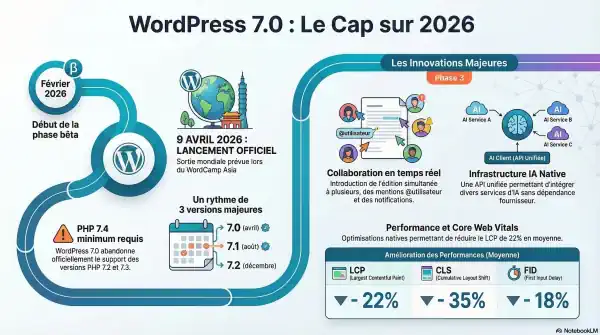
L’année 2026 marque la fin d’une période de transition. Après une année 2025 plus calme, l’écosystème renoue avec un rythme soutenu de trois versions majeures par an. Le coup d’envoi de ce cycle sera donné le 9 avril 2026 avec le lancement de WordPress 7.0 lors du WordCamp Asia.
Pour les agences, les freelances et les propriétaires de sites, cette version de WordPress 7.0 n’est pas une simple mise à jour de maintenance. C’est une réponse stratégique aux défis de l’ère de l’intelligence artificielle et aux exigences croissantes de performance. WordPress 7.0 se positionne désormais comme un système d’exploitation moderne pour le web, capable de rivaliser avec les outils SaaS les plus agiles tout en conservant son ADN open-source.
Dans ce guide complet, découvrez les principales nouveautés de WordPress 7.0, les impacts pour les développeurs et les bonnes pratiques pour préparer la mise à jour de votre site.
Les principales nouveautés de WordPress 7.0
L’IA native sans dépendance : Le « WordPress AI Client »
Contrairement à d’autres plateformes qui imposent un modèle d’IA propriétaire, WordPress 7.0 introduit une infrastructure neutre et agnostique. Le WordPress AI Client ne transforme pas le CMS en un simple générateur de texte, mais fournit une couche standardisée sur laquelle tout l’écosystème peut s’appuyer.
Cette approche repose sur deux piliers techniques :
- L’API unifiée : Elle permet de connecter n’importe quel modèle (OpenAI, Anthropic, Google Gemini ou même des modèles locaux type Llama) via un écran centralisé de gestion des clés nommé « AI Credentials ».
- L’Abilities API : Elle donne à l’IA la capacité de « comprendre » et d’exécuter des actions natives (créer une page, modifier un menu, optimiser une image).
« WordPress ne devient pas un « CMS IA », il propose une infrastructure IA sur laquelle plugins et thèmes peuvent s’appuyer. »
D’un point de vue pragmatique, le WordPress AI Client utilise la WordPress HTTP API native. Cela signifie qu’il n’introduit aucune dépendance externe lourde, garantissant une sécurité accrue et une maintenance simplifiée pour les développeurs soucieux de l’intégrité de leur code.
La fin des silos : Collaboration en temps réel et workflows
La Phase 3 du projet Gutenberg atteint son apogée avec la version 7.0. WordPress devient un véritable outil de travail collaboratif, réduisant drastiquement la dépendance à des outils tiers comme Google Docs ou Notion pour la phase de production de contenu.
La collaboration se structure autour de deux axes :
- Collaboration asynchrone (Notes) : Le système permet désormais de laisser des commentaires au niveau d’un fragment de texte précis, de notifier des collaborateurs via des @mentions et de recevoir des Digest notifications (résumés quotidiens ou hebdomadaires) pour suivre l’avancée du projet sans surcharge cognitive.
- Collaboration en temps réel : Cette fonctionnalité permet de voir les curseurs de vos collègues et d’éditer simultanément un bloc.
Analyse de l’expert : Bien que prometteuse, l’édition en temps réel reste identifiée comme expérimentale au lancement de la 7.0. Le défi majeur réside dans l’infrastructure serveur : la plupart des hébergements standards ne supportent pas encore nativement les WebSockets nécessaires à une synchronisation instantanée sans latence.
Performance brute : Des gains spectaculaires sans toucher au code
Avec WordPress 7.0, la performance devient une fonctionnalité native. Le CMS intègre des optimisations profondes qui impactent directement vos Core Web Vitals et, par extension, votre SEO et vos taux de conversion.
L’agence Blaaaz a synthétisé les gains moyens observés grâce aux optimisations du cœur (isolation via iframe, lazy-loading prédictif, requêtes SQL optimisées) :
| Métrique Core Web Vitals | Gain moyen observé | Impact Business |
| LCP (Largest Contentful Paint) | -22 % | Chargement visuel rapide |
| CLS (Cumulative Layout Shift) | -35 % | Stabilité visuelle parfaite |
| FID (First Input Delay) | -18 % | Réactivité immédiate |
Impact sur votre ROI : La technique n’est plus un coût, mais un levier de croissance. Un cas d’étude sur un site WooCommerce a démontré qu’une réduction du LCP sous les 2 secondes a généré une hausse de 12 % du taux de conversion. En 2026, WordPress vous offre ces gains « out-of-the-box ».
Modernisation technique : L’adieu aux versions obsolètes
WordPress 7.0 marque une rupture nécessaire pour réduire la dette technique. Le support des versions PHP 7.2 et 7.3 est abandonné : PHP 7.4 devient le minimum absolu.
Pour les développeurs, ce changement libère le potentiel du langage avec l’accès aux :
- Typed properties (propriétés typées) pour un code plus robuste.
- Arrow functions pour une syntaxe plus concise.
- Null coalescing assignment operator (
??=) pour simplifier les conditions.
La grande révolution pour le backend est l’arrivée des blocs PHP-only. Il est désormais possible de créer des blocs Gutenberg personnalisés sans toucher à React ou JavaScript. Cette avancée démocratise la création de composants sur mesure pour les développeurs traditionnels, tout en allégeant le poids des scripts chargés côté client.. Design System et gestion native des polices
L’expérience du Full Site Editing (FSE) gagne en maturité avec une personnalisation plus intuitive.
- Gestionnaire de polices universel : Accessible via Apparence → Polices, ce nouvel écran permet de gérer ses fichiers (WOFF2, Google Fonts) localement. Points forts : il est compatible avec les Thèmes Classiques, ce qui permet de moderniser la typographie d’un site ancien sans tout reconstruire.
- Le « Grid Block » intelligent : Ce bloc permet enfin de créer des grilles responsives complexes. Vous pouvez définir une largeur minimale de colonne, garantissant que votre mise en page s’adapte parfaitement entre mobile et desktop sans plugin tiers.
- Standardisation UI : L’introduction des DataViews et DataForms unifie l’interface d’administration, offrant une navigation plus fluide et cohérente entre les différents écrans du back-office.
Prêt vers WordPress 7.0 pour le 9 avril ?
WordPress 7.0 représente le point de maturité du projet Gutenberg. Le CMS ne se contente plus de gérer du texte ; il orchestre des workflows collaboratifs et une infrastructure IA solide, tout en garantissant des performances de premier plan.
Mon conseil stratégique : Malgré l’enthousiasme, la prudence reste de mise. Ne mettez pas à jour vos sites de production le jour J. Attendez une à deux semaines et effectuez systématiquement vos tests en environnement de staging. Vérifiez particulièrement la version PHP de votre serveur, car le passage à la version 7.4 minimum est non négociable.
L’intégration native de ces outils collaboratifs et de l’IA va-t-elle simplifier votre routine quotidienne, ou redoutez-vous une complexification de la gestion de vos projets ? La réponse se trouve dans votre capacité à adopter ces nouveaux standards dès aujourd’hui.
Ressources officielles:
Documentation officielle WordPress
Changelog WordPress
Comment préparer la mise à jour vers WordPress 7.0
Avant d’effectuer la mise à jour, certaines précautions sont recommandées.
Sauvegarder votre site
Effectuez toujours une sauvegarde complète :
- fichiers
- base de données
- configuration du serveur
Tester la mise à jour
Il est préférable de tester la mise à jour sur un environnement de staging avant de l’appliquer en production.
Vérifier la compatibilité des plugins
Certains plugins ou thèmes peuvent ne pas être immédiatement compatibles avec la nouvelle version.
FAQ : WordPress 7.0
Quand sort WordPress 7.0 ?
La sortie de **WordPress 7.0 est attendue dans les prochaines versions majeures du CMS, avec un cycle de développement continu.
Faut-il mettre à jour immédiatement son site ?
Il est conseillé d’attendre que les plugins essentiels soient compatibles avant d’effectuer la mise à jour.
Quels sont les principaux risques ?
Les risques concernent surtout les incompatibilités avec certains thèmes ou extensions.
Conclusion
La version WordPress 7.0 confirme la volonté de moderniser le CMS tout en conservant sa philosophie open source. Les améliorations de performances, les évolutions de l’éditeur et les nouvelles possibilités offertes aux développeurs ouvrent la voie à des sites toujours plus performants.
Pour les organisations souhaitant exploiter pleinement les capacités de WordPress, il devient également intéressant d’explorer les possibilités offertes par l’intégration de l’intelligence artificielle.
Besoin d’optimiser votre site WordPress ?
Skida développe des solutions open source pour :
- automatiser WordPress
- connecter WordPress aux API d’IA
- améliorer le référencement SEO des sites WordPress